

Personally, I love this kind of post. I love the idea of cognitive restructuring. There’s something about understanding how your brain works and learning how to unlearn. When I went to university for the second time, I went to sit through a university degree where I had to unlearn a bunch of concepts that took me years to develop. Economics, by definition, is the study of the choices that people make among options under certain financial constraints.
Throughout this degree, there is a strong focus on finding the optimal solution to … anything. Based on the information that you can find in the scenario that you’re in, can you find all of the costs and benefits? Can you weigh them accurately? Opportunity costs accurately accounted for? Shadow costs? What’s the probability of A given B happening and how does this impact the final outcome? All of these ideas, but only mentions ‘updating the model’ and it didn’t seem to strive for a lot of deep reflection into why. Have you ever read a business textbook? Have you considered what is in those books? Where is the discussion of ethics? What chapter is usually placed? I can tell you with good probability that they’re around chapter 3, and towards the end of it. At least, this was the case 10 years ago. One would like to think that this content has updated since what we’ve seen in the financial, governmental, and educational sectors for 20 years, but that might be a bit too far reaching. I digress.
These are two of my favourite sentence starters that I have picked up to develop a cognitive understanding of concepts:
I used to think ….
Now I think ….
Is that beautiful? Simple and beautiful. The simplicity of this satiates the economics side of me, a degree that looks to models those choices that people make. A big term within that field, especially from a modelling perspective, is parsimony. How can we account for only a few variables to explain the actions of the many? A great example of this is how to explain the relationship between Gross Domestic Product and the employment level:
(Ӯ-Y)/Ӯ = c(u-ū)
Where:
- Ӯ = potential GDP,
- Y = actual GDP,
- c = factor relating changes in unemployment to changes in output,
- u = actual unemployment rate, and
- ū = natural rate of unemployment.
In a non-subtle segue back to this post, I like to use this mentality to update my thinking. A scary part for me to publish my thinking like this is knowing that, before I even post it, there will inevitably be a better (and dare I say easier) way to implement some of the solutions that I have developed for various problems. But, this is what I enjoy about doing all of these projects (a series of mini projects, really — I get to learn along the way and update my thinking).
I reflected on all of the posts that I have done over the past year and a bit, and included my previous learnings that I haven’t published on this site. The following list is my own interpretation of ‘I used to think, now I think’ in my post format.
Outline the list in short format:
- Wildcards,
- Logic redundancy,
- Using too many words to describe concepts/tools,
- Functions vs Formulas,
- User Experience regarding Sheet layout,
- Use Google Finance over IMPORTXML, and
- Don’t overuse ARRAYFORMULA.
1. Wildcards
If you haven’t come across wildcards in Excel/Google Sheets before, they are this symbol *. They are used in functions and search operations to represent any sequence of characters, allowing for flexible and broad pattern matching. In my solutions, I attempt to make things as dynamic as possible by allowing users to control any necessary variables. When constructing particular formulas you might need to account for particular user input use cases. These can include entering incorrect information or incomplete information. A good example of this is from my How to use VLOOKUP post where we’re able to type in part of a player’s name and still output their statistics:
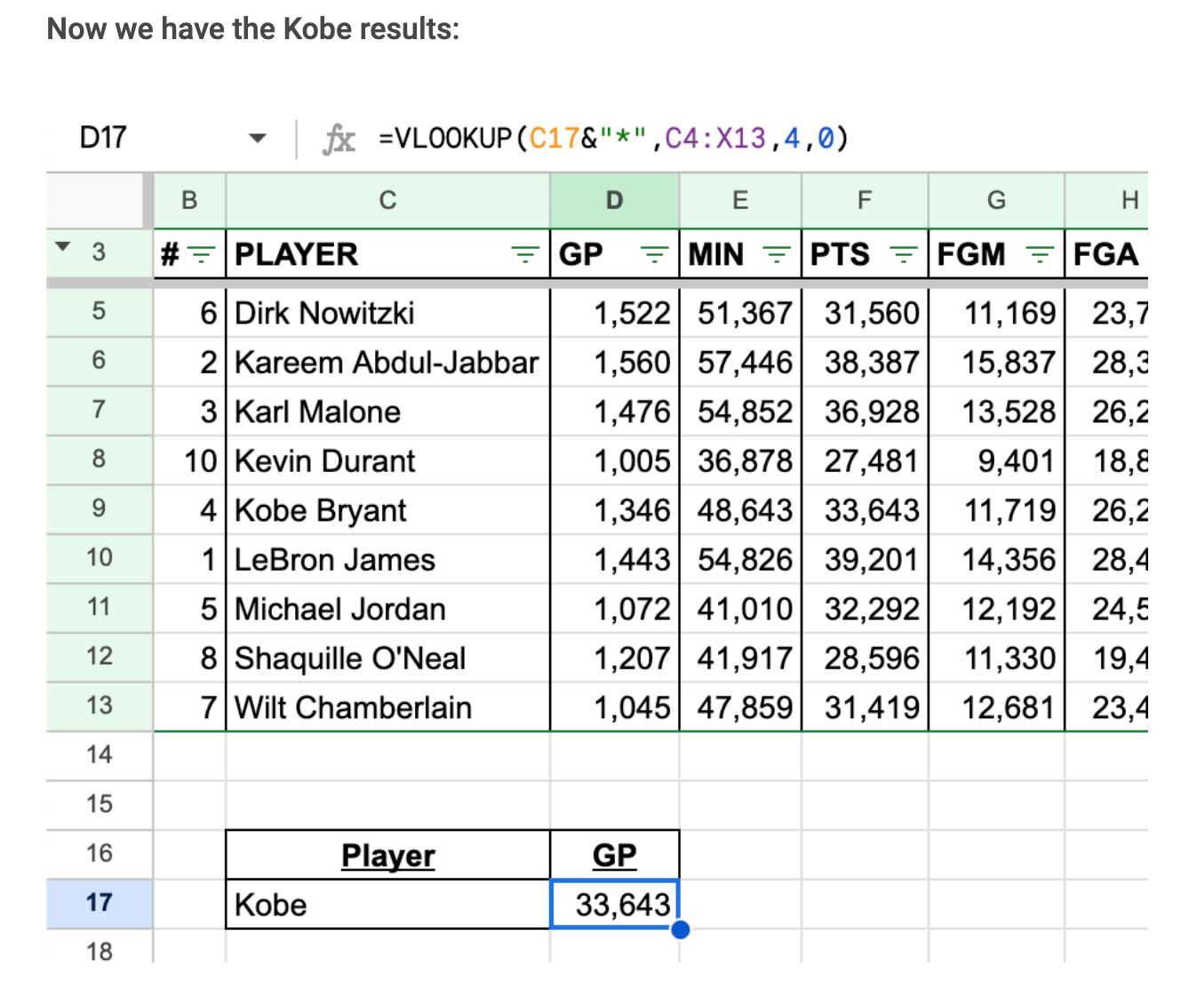
Although I am separating out the user input from the wildcard (*), I hadn’t actually considered what this looks like in a text format. The input into VLOOKUP would actually end up looking like Kobe*. This means that if I ended up hard coding this search term, I could actually just hard code it as ‘Kobe*’, whereas I would have originally taken the extra steps for: “Kobe”&”*”.
2. IF(NOT(ISBLANK()))
I rarely go onto Reddit, but when I do it’s usually to check out the r/sheets subreddit. I like to think of myself as a (wanting to be) helpful person so I’ll peruse the newest posts and see if there’s anything that I can do. Even more rarely, there will be the off chance that there’ll be something that I’ll feel comfortable contributing to. The following thread was a moment where I was able to update some redundant logical thinking that I had been carrying for a few years; https://www.reddit.com/r/sheets/comments/138rpx5/if/.
@ashtonlaszlo posted this question: =if ‘cell not empty’, how do I write this?

Originally, I would be considering how I would want the True result of the IF function’s logical condition to look. This mental thinking (bias in processing the information/solution) would take precedence over the question being asked and considerations of functional efficiency, especially at scale. @gsheets145 assisted in updating my flawed logic in this computational thinking.
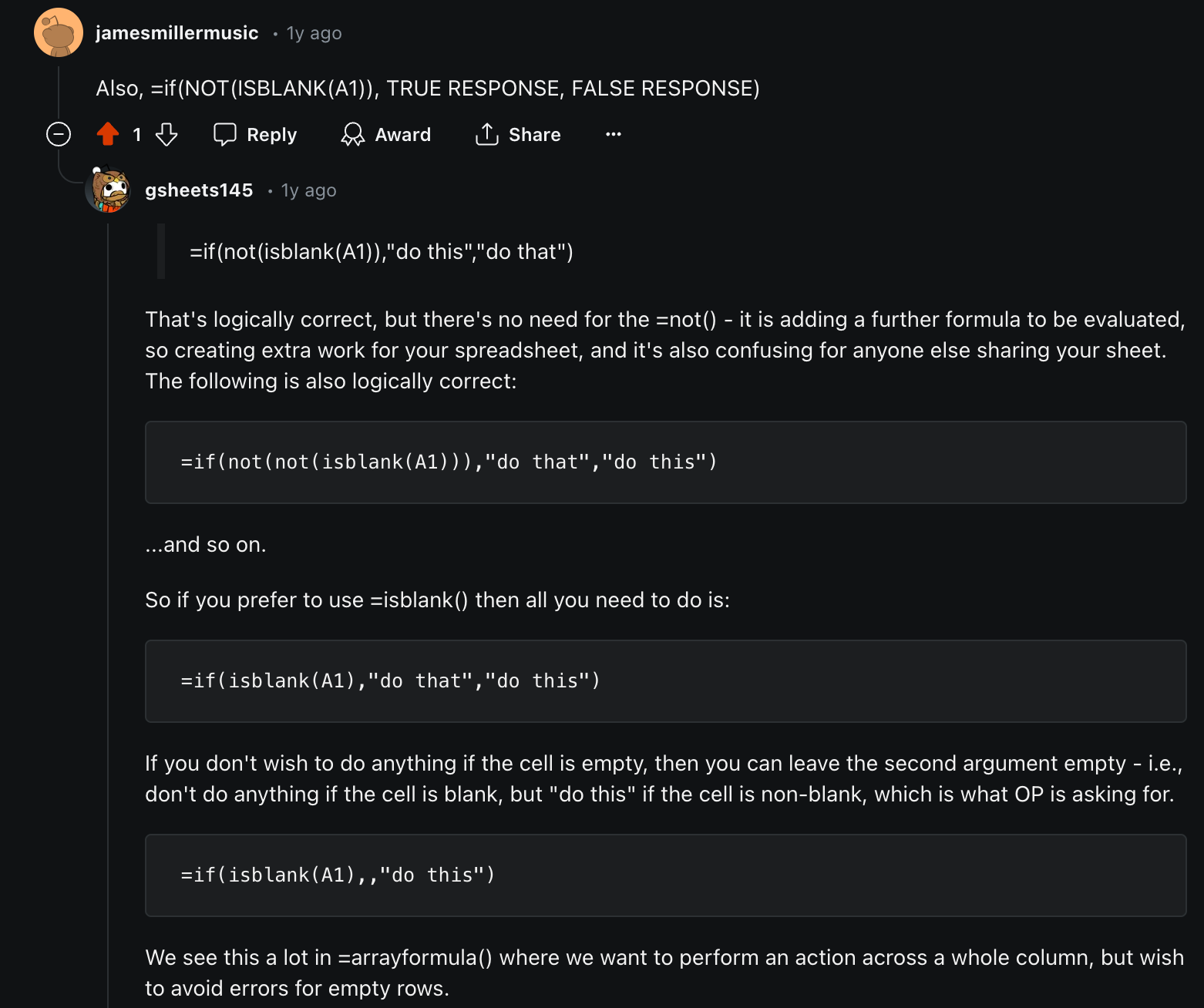
They provided a fantastic example of why my code was creating logical redundancy. By adding a series of NOT()s in IF’s logical condition, it provided me the thinking space to consider what this would look like at scale:

It’s an interaction that I will probably remember forever, and a piece that I hold quite closely when considering how I can update my thinking.
3. Autofill handle
In the words of Kevin Malone (The Office), “why waste time say lot word when few word do trick?” Is there a concept or object that you’ve taken an entire paragraph to describe as opposed to just using the one word? Like parsimony? Yeah, it’s something that I think about often and it threads this weird social line sometimes of using concision (correct terminology) as opposed to easing people into the conversation.
A specific example where I’ll be updating my Excel/Google Sheets lexicon is through the use of the term ‘Autofill handle’. As you can see in this post about Google Sheets FAQs and not so FAQs, I’ve already prepped the read into the next step, but I’ve stated that ‘If we drag the little blue ‘copy cell’ dot across to B2 (Sales), we should now see that value copied over from sheet FAQ2’.
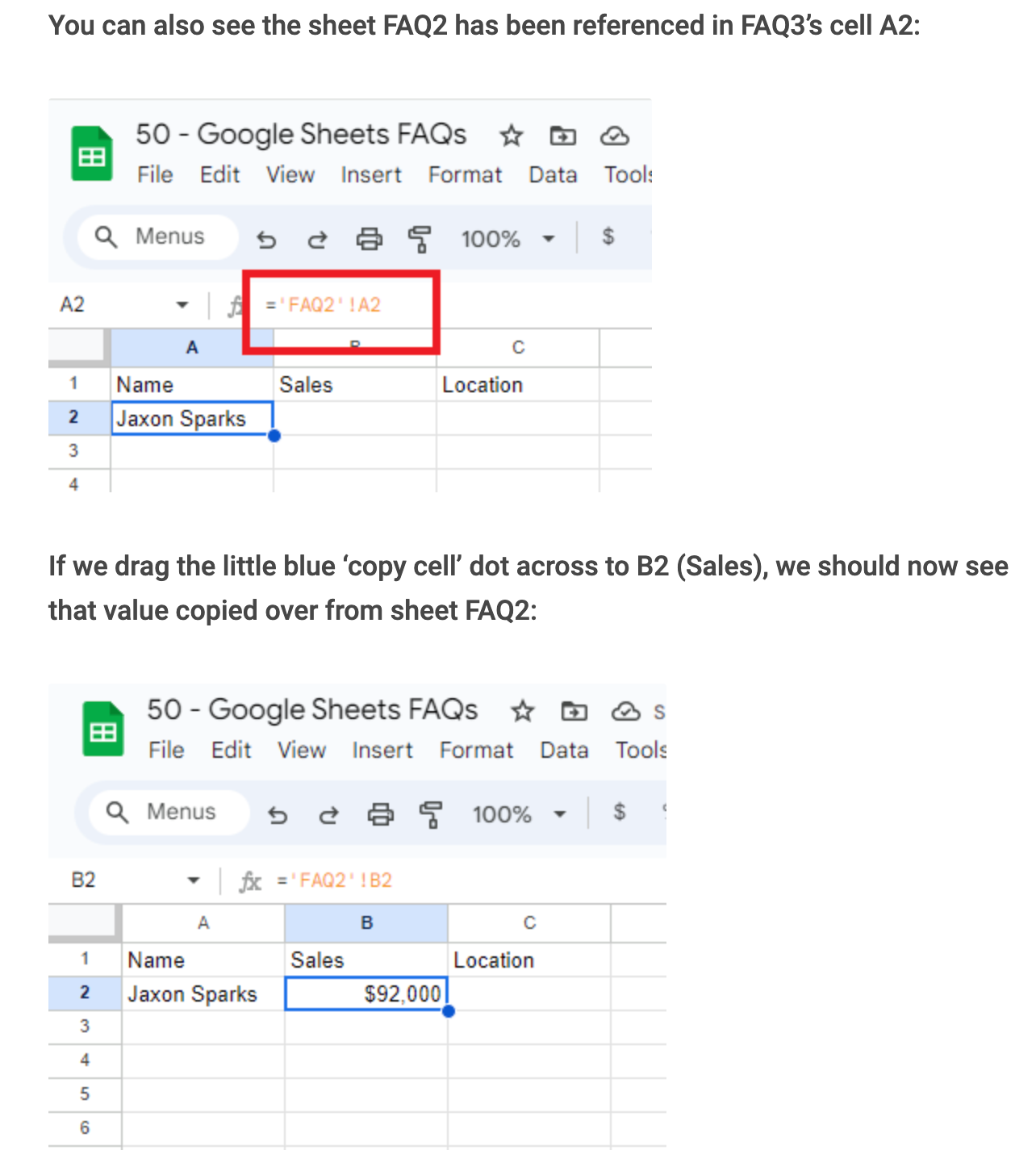
Now, I believe this is a much nicer sentence:
‘If we drag the autofill handle across to B2 (Sales), we should now see that value copied over from sheet FAQ2’.
The same goes for this post about the Efficient Frontier:
‘I can now format this cell as a percentage, drag the formula across and down too:’
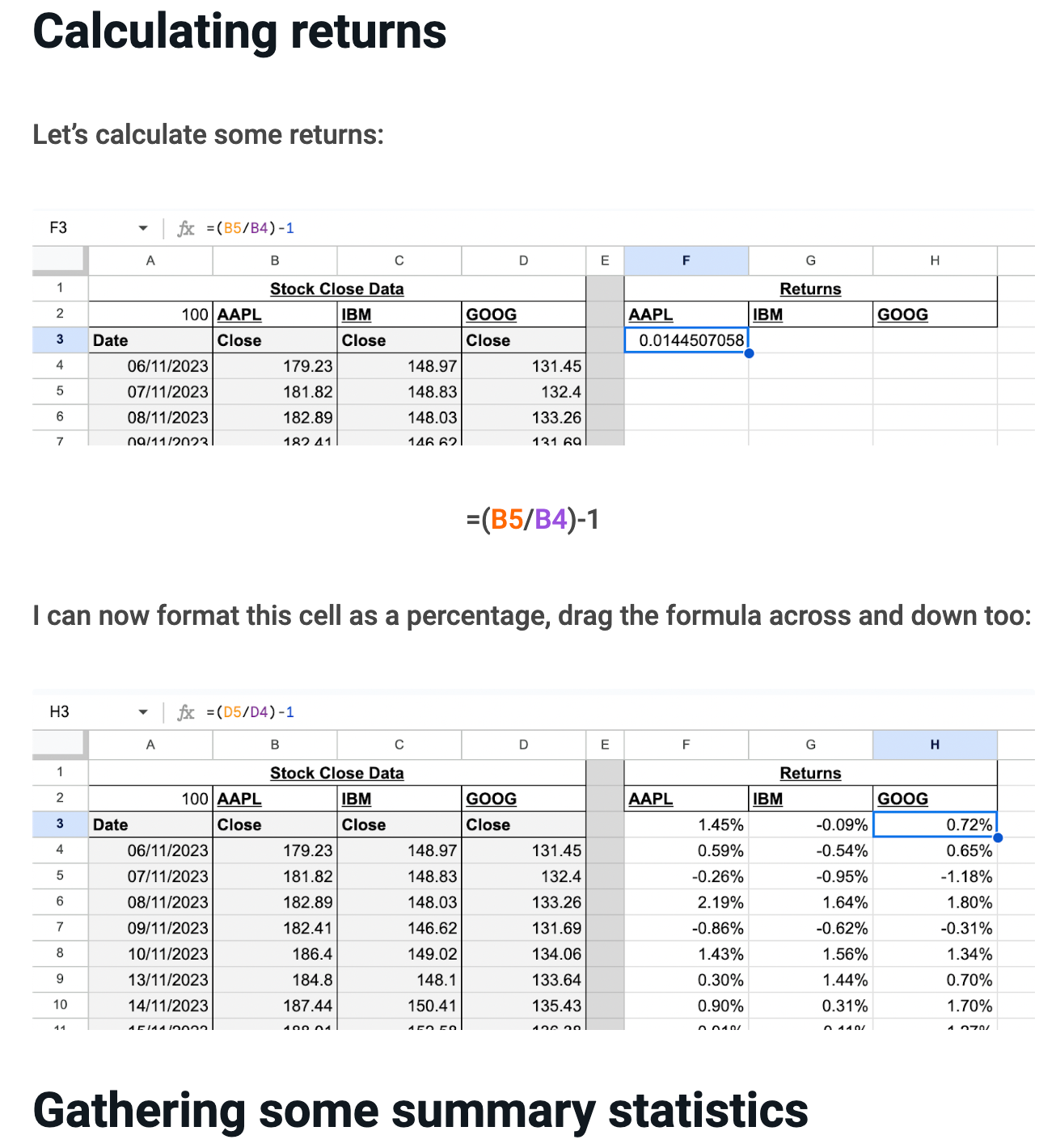
‘I can now format this cell as a percentage, using the autofill handle across and down:’
Is there a post that you’ve seen where I could update some text to include ‘Autofill handle’? How’s that prompt for you to start clicking through the website?
4. Function vs Formula
What is a function? What is a formula? Within the Excel/Google Sheets context, I’m sure that there’s many people who will use these terms as synonyms for one another; interchangeably. Although I’ve attempted to be as considered about this distinction in my writing as I can be, I’ve set myself a goal of being accurate from now on. I’m sure that there’s been posts where the solution description is calling for ‘formula’ and I’ve used ‘function’ in its place.
These are the definitions that I’m going to be running with from now on:
Function: a function is a predefined formula available in MS Excel or Google Sheets.
Formula: a predefined calculation that uses cell references or hard-coded numbers to calculate a cell value
Formulas can be made up of functions, but not the other way around.
Example of a Function
Function: SUM
- Usage: =SUM(A1:A5)
This function SUM takes a range of cells from A1 to A5 and returns the sum of those numbers.
Example of a Formula
Formula: =SUM(A1:A5) + B1 – AVERAGE(C1:C5)
This formula performs the following steps:
- Uses the SUM function to add up the values in cells A1 through A5.
- Adds the value in cell B1 to the result of the sum.
- Subtracts the average value of the range C1 through C5, calculated by the AVERAGE function.
So, while SUM and AVERAGE are both functions, the entire expression =SUM(A1:A5) + B1 – AVERAGE(C1:C5) is a formula that combines these functions with additional operations to produce a result.
5. Placing main functions at the top of sheets, and not down the bottom
Another process that I am aiming to update is my use of user-friendly understanding and interaction. What you see in my sheets are the way my brain processes the problem, with the information laid out in the order I am seeking to solve it. However, if someone were to open this sheet and attempt to use it straight away, they would be seeing step 1, as opposed to the overall result. Given what I am attempting to develop these sheets for, I do not believe that this is ultimately the best practice for all users.
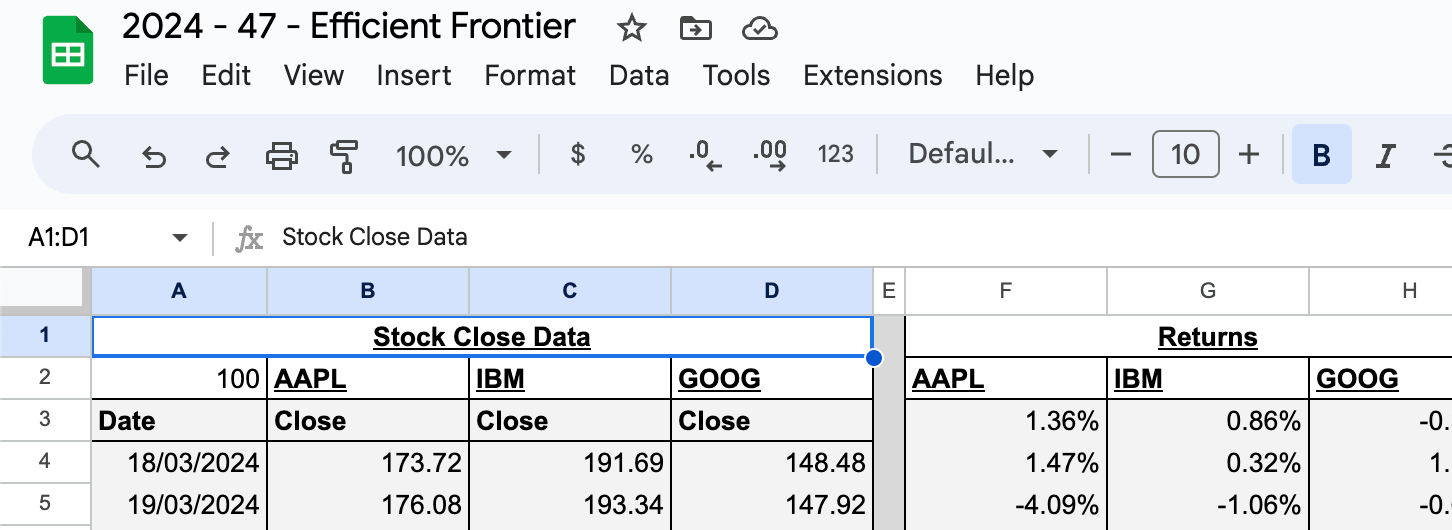
A prime example of this is the Efficient Frontier post where it kicks off with the stocks that the user would choose to allocate within the sheet:
If they want to see their decision, they need to scroll all the way to the right to see this outcome:
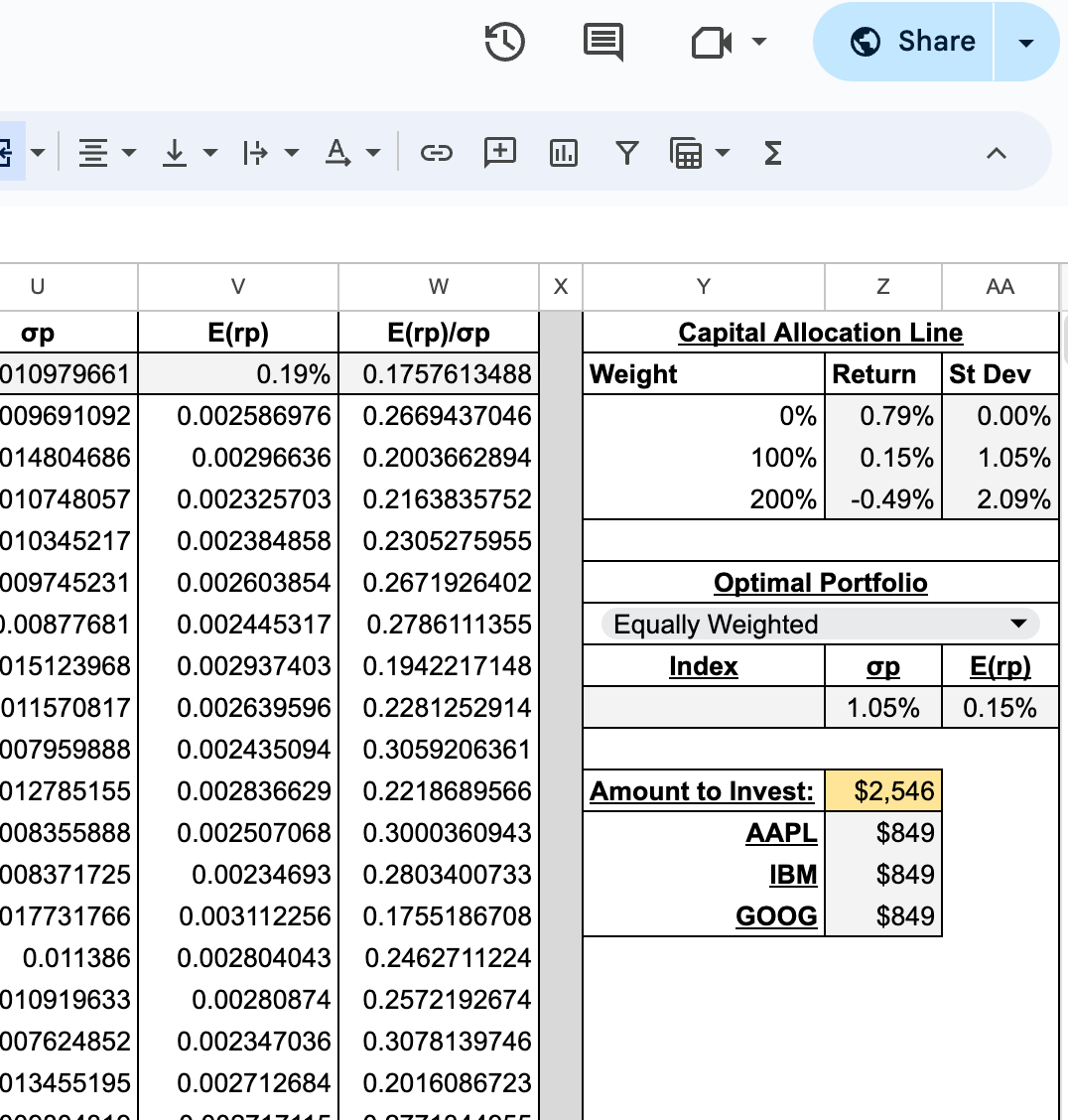
When thinking ahead to someone ultimately using this multiple times a day, it is contradicting my previous statements about searching for the elusive optimal point in business processes and would cost the user 1 second per use * 3 uses per day * 6 days per week * 52 weeks per year = 936 seconds, which is 15.6 minutes per year.
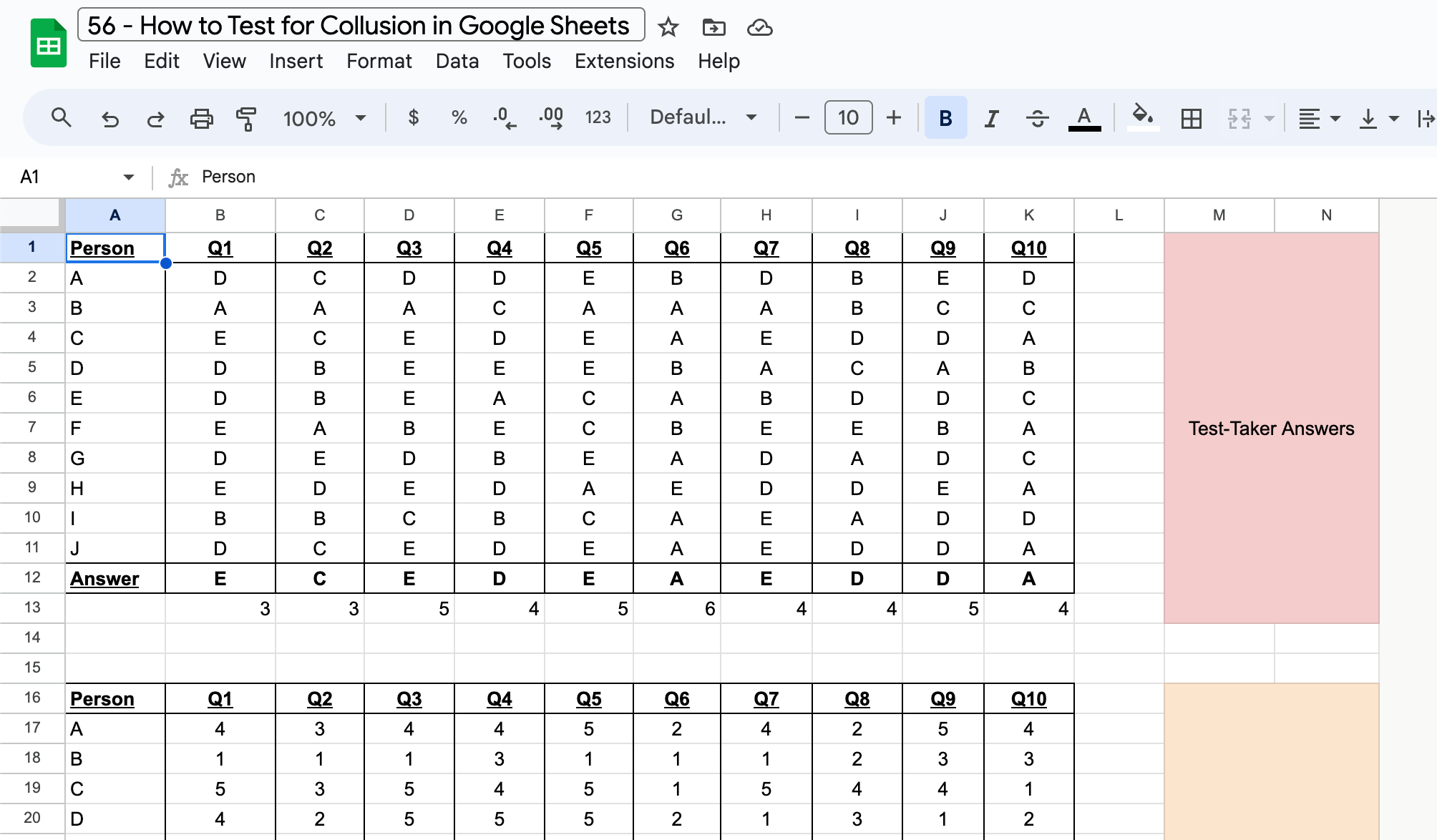
One more example is from the How to Test for Collusion post where the user starts off with the questions/answers grid that they need to input, then scroll down to see the result:
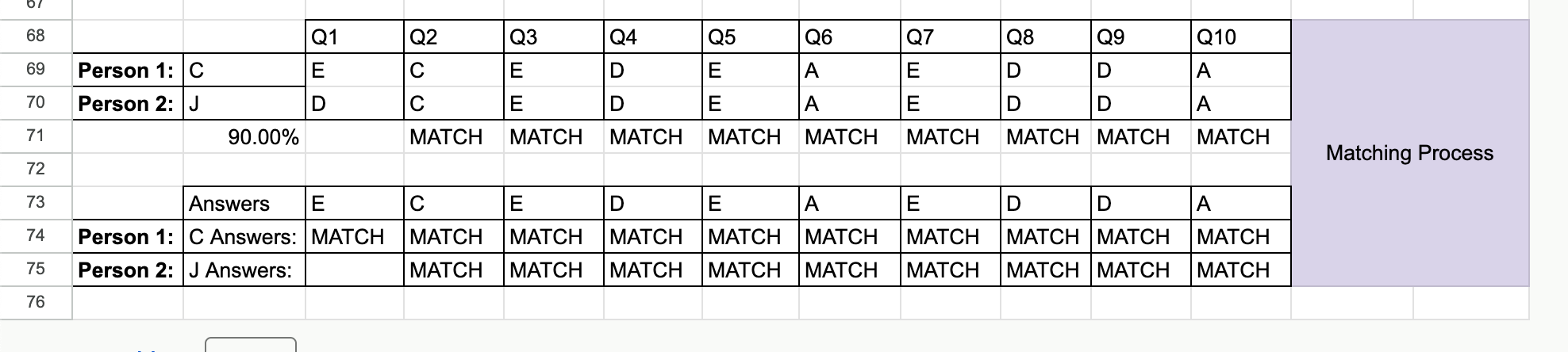
What I am aiming to do from this point is create the sheets, such that the final information is waiting for the user at the top of the file when they open it. My approach will be creating all of the information, process that data, then once everything has been created make sure that I place the user interaction pieces at the top of the sheet for the user’s ease.
6. Google Finance over IMPORTXML
Regarding any Finance posts that I make, I was getting into the groove of using IMPORTXML to pull data from particular stock tracking sites, e.g. Yahoo, Marketwatch, etc. I was mainly using sources other than Google Finance because the stock information in Google primarily did not include a publicly traded firm’s beta value. However, this was all to check the day before my post about Building a Stock Portfolio Tracker in Google Sheets was released where a bunch of my calculations were erroring out due to changes made to the marketwatch website. I was unable to use following code to pull the necessary ‘beta’ information:
=IMPORTXML(“https://www.marketwatch.com/investing/stock/anz?countrycode=au”,”/html/body/div[3]/div[6]/div[1]/div[1]/div/ul/li[7]/span[1]”)
In terms of planning, this had flow-on effects to the ‘homework’ that I had prepared for readers in a following post for a Sales Visualisation Dashboard. However, I have since returned to the function (see how I’m already applying my updated knowledge?) GOOGLEFINANCE and the information has become much more consistent in tracking firms financial information.
7. Don’t Overuse ARRAYFORMULA
Since I’ve taken to using ARRAYFORMULA, I’ve noticed a tendency to overuse it. I believe that this is just a classic case of using something again, again, and again (in various contexts) until you instinctively understand it. Genuine step away from the blog post reflection thought: I wonder if this has anything to do with learning an instrument. I grew up learning guitar and I used to drill the same few bars over and over again until I hit all the notes and rhythms like the recording I was listening to.
Even though I believe I overuse ARRAYFORMULA, I genuinely wonder how useful it actually is in circumstances. Given my approach to automation, I am attempting to grasp the concept so that I can integrate it for apt solutions. Specifically speaking for Excel automation, I see the power in using ARRAYFORMULA around the potential array of data that users (of my creations) could input. Instead of instructing them to create more rows/columns and updating formulas to align with their size, the way I implement ARRAYFORMULA would be catering to their use case.
Conclusion
I’m not sure if I’m an overthinker by definition, but if you give me the space to consider how I could improve myself, I will definitely put the effort in and attempt to draw out the information that I think is pertinent to the scenario. Although I could add many more to the list, I felt like this list of Excel/Google Sheets-specific thought updating was a fantastic place for me to keep myself accountable for areas that I am to improve my practice. I can tell you that another element I will be seeking to improve is professionalism around Excel worksheet presentation.
When I take an honest look at my created works, I understand that they look a bit tacky and hacky. For this, I will create another post around my approaches to creating a more professional portfolio of Excel (specific) documents and how I will implement and update my approaches to aesthetics as I continue.


4 responses to “62 – Updating Previous Thoughts”
[…] Whilst hanging out the washing on the weekend, during some beautiful last moments of Tasmanian summer, the process was running through my head. Well, I’m assuming that it was one of the last hot summer days; I can’t predict the weather. Thinking about how spikes can blow forecasted values out, I thought of a few tactics that I could implement to help drive a bit more stable direction. Overall, the data is seeing growth change over time and the models that I am advised by aren’t taking that into account. The following are areas that I am going to delve into to see which main drivers are going to best suit the situation. My end goal is to maintain a clean and clear script that doesn’t overinflate the model; a drive for parsimony. […]
[…] between the numbers and how they could be connected from another perspective), possess a drive to correct any misunderstanding I have of something along the way, finding beauty and appreciating it for its high- or low-entropy […]
[…] predictor. This is essentially what data, science, and learning is all about, right? Reviewing and updating previous notions or ideas; see more in the continuing BPM series over the next few weeks. After reviewing this code, […]
[…] what I’ve said in this previous post about updating my mindset, I want to make sure that this is as user-friendly as possible. So, I’ll make sure that I clean […]