-

As an extension from last week, this week is showing how we can take one language (VBA) and translate/transform it to another (JavaScript). We’re taking it from the native Microsoft Excel and putting it into the Google Sheets cloud. https://docs.google.com/spreadsheets/d/14yweiJQAF9tef1J2c0a4Bj8viCOQgqkwUHx8GezdQr8/edit#gid=0 Fahrenheit to Celsius Converter First, let’s start by opening up a new Google Sheet: Next,…
-

So. It’s come to this. You have developed so many formulas that you’re sick of having to use the same combination over and over again to give you the same outcome for different datasets. Did you know that you can make your own custom formulas in Excel? I’m sure that this is what people would…
-

https://docs.google.com/spreadsheets/d/1Y41xUwBQgN5hC5DQd0m7GE60OsfJsghTBZA2YZfxRNw/edit#gid=0 Sales Dashboard If you remember from last week, I posted a Dashboard. This week, I wanted to walk through how you can make it in Google Sheets. First, let’s start by laying it out. Then we can add a logo of the brand to the left-hand side. Next, I’ll create a title so when…
-

Learn the fundamentals of Statistics Learn SQL Learn Python for Data Analysis Learn Data Manipulation and Visualisation Learn Statistical Analysis Learn Data Visualisation Tools Work on Projects Learn Data Storytelling What a broad term this is; data manipulation and visualisation. Data manipulation could be something as simple as transforming a field from text to number.…
-
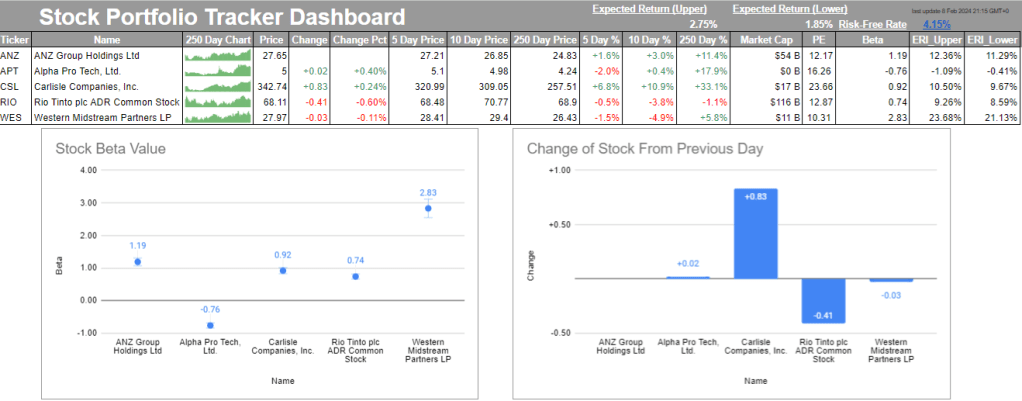
Last Week’s Homework Here is the (safe) download link if you’re interested in checking: Stock Portfolio Do you have some stocks hidden away somewhere? How are they going? What did they return yesterday? What about 5 days ago? 10 days? 250 days? Do you currently know what the firm’s beta is? At the end of…
-

Last Week’s Homework How did you go with last week’s task? Check the spreadsheet to see my solution. Excel’s What-If Analysis Tool Have you ever been in that situation where someone asks you numerous times, “what if we did this? What if that happens? What if we went left instead of right?”? Have you ever…
-

This is the third instalment in the optimisation series. In the previous three posts, we have seen how we can: (long-form) find the profit maximising position of a business, understand how we estimate models to best predict future events, and consider numerous formulae to solve for the optimised point. What we will be going through…
-

In the last post, we identified outliers in a dataset following specific steps. We then discussed the effects that these outliers have on data and the impacts they have on decision-making. This week is about continuing this foresight and seeing how we can forecast future sales for each individual product that we have been tracking.…
-
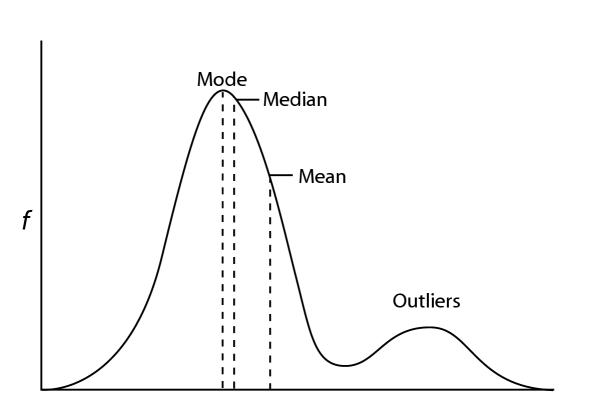
The first time I came across a ‘Z-score’ I was in an ‘Introduction to (economic) Statistics’ class. I had remembered terms like standard deviation, mean, mode, and average from High School, but never really understood how to use them in day-to-day work. Let alone Z-scores. As I journey through life, I find more connections to…

James Miller CV
Data Analyst | Process Improvement | Skilled in Statistical Analysis, Data Visualisation, and Instructional Delivery | Excel, Google Sheets, SQL, Python, Power BI
Blog


Leave a Reply