
When I watched this episode of Silicon Valley, I never felt more connected to a quote. Monica Hall’s criticism of Pied Piper is that “the whole thing feels engineered.” To be fair, the entire quote is “I mean, it’s not, it’s not the UX or the design or anything that you can tweak. It’s just the whole thing feels engineered.” I only give it this context because Monica always seems to get a bad wrap from that show, even though she’s written so well. But, that’s a tangent for another day — women who have been written poorly in fantastic shows, e.g. Skyler and Marie in Breaking Bad.
This week’s post is a throwback to another post where I’m setting out to be more proactive in updating parts of my thinking. This is specifically about the presentation of information on the screen, such that a user can engage with it more intuitively and intently. You could consider it to be a blend between the UX and UI journey. Don’t get me wrong, I would not call myself an expert in either of these two disciplines, but I definitely have developed insights (and intuitions) into UX, which has an impact on UI. But, I’m of the mindset where I can’t say something isn’t great without being able to explain explicitly why.
With this idea in mind, I have considered my previous posts and how I need to improve my UI game a bit more, especially when it comes to professionalism with Excel/Google Sheets. My approach to this was to analyse various different sources of “professional-looking” spreadsheets and produce a list of common themes between them, but also inconsistencies in the presentations. These inconsistencies are either industry-specific or tastes/preferences of people that naturally change over time.
Here is the list of common themes that I was able to pick up from my research:
- Consistent Formatting:
- Uniform formatting; (bold) headers, subheadings, and shading
- Use templates, consistent filenames, and standard (limited) fonts, sizes, colours.
- Text and Alignment:
- Align text left and numbers right.
- Centre titles, bold headers, and leave some cells empty to create space.
- Use of Colour:
- Limit your colour to only a few, use it sparingly, stick to dark text on a light background, and use palette for ease.
- Data Visualisation:
- Use a variety of charts, graphs, and conditional formatting for subtle visual representation.
- Include a welcome sheet and separate your data for clarity.
- Headers and Labels:
- Use descriptive labels and clear headings for easy comprehension.
- Name your worksheets and bold headers.
- Consistent use of clear structure and control over data input.
- Space and Layout:
- Leave the first row and column empty for breathing space.
- Design for longevity and ensure a clear structure for future scalability.
- Control data input and maintain a clear structure for readability.
Here is the list of inconsistencies that I was able to pick up from my research:
- Cell Borders:
- Remove cell borders to avoid the traditional spreadsheet look.
- Play with grid lines and consider subtle decoration.
- No specific mention of cell borders, but emphasise clear structure and control.
- Sharing and File Format:
- Convert spreadsheets to PDF to maintain formatting when sharing.
- No mention of converting to PDF.
- Focus on file names and structure without specific advice on sharing formats.
- Complexity of Formulas:
- No specific advice on formula complexity.
- No mention of formula complexity.
- Avoid overly complicated formulas and ensure scalability.
- Data Validation:
- No specific advice on data validation.
- No specific advice on data validation.
- Emphasise control over data input and use data validation.
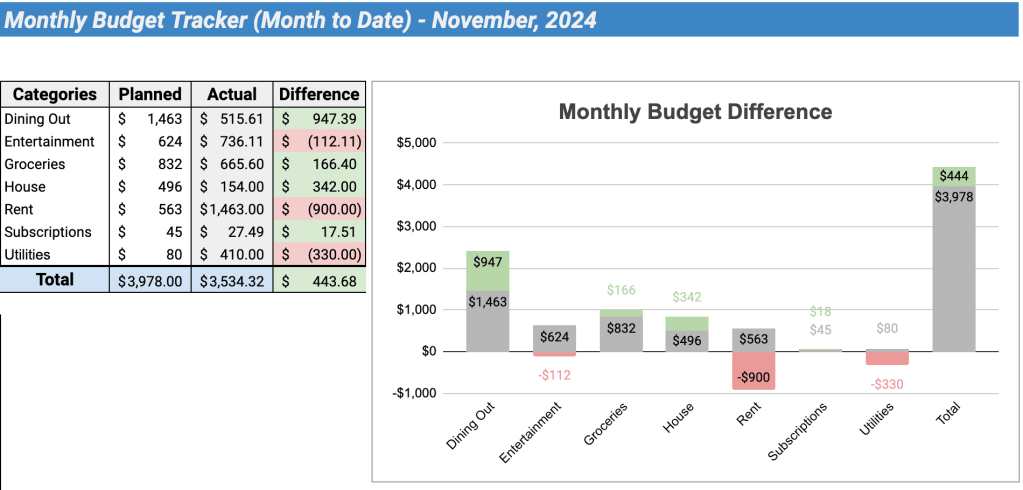
Using this collection of common themes and inconsistencies, I have created the following spreadsheet. Feel free to use this resource as you see fit, and show me how you have updated it to be more professional to your linking!
https://docs.google.com/spreadsheets/d/1Mf2gPAE4gx5F5t4gDxq6VaGFERXpuJdLOES8VRTT2DU/edit?gid=0#gid=0
 James Miller CV